
Every feature built for one job.
commitplain is not a generic writing assistant. It connects directly to your GitHub repository, reads the real commit history, and produces a professional executive summary — ready for your review before it reaches your client.
Every feature below has one job: produce a weekly client report that can be reviewed before sending. The rest of the product exists to make that one moment cheaper and faster than writing it by hand.
One product. One job.
Every feature in commitplain converges on a single outcome: a client-facing report that reads like a human wrote it and that you can approve in under a minute.
- Real commits from GitHub — no copy-pasting required
- Executive draft generated in seconds, in the client's language
- You review and approve — nothing goes out without your decision
Project update — week of April 14
Hi Sarah, here's what we accomplished this week:
- The login system was improved — users no longer get unexpectedly signed out.
- You can now export all invoices at once in a single file.
- Internal infrastructure was updated to improve reliability and speed.
Two types of users. One tool.
Whether you're a solo developer managing a handful of projects or an agency handling dozens of client accounts, commitplain adapts to your reporting workflow.
Built for the focused solo developer
You do the work. You handle the communication. With commitplain, you get weekly or monthly executive summaries in seconds — reviewed by you, sent when you decide.
- Up to 3 active projects — enough for most solo freelancers
- Weekly or monthly report cadence
- Up to 50 commits per report period
- Single recipient per project
- 6 output languages for international clients
- Manual review and approval on every report
Built for high output, not headcount
Multiple repos, daily automation, deep code analysis. The Agency plan removes the hard limits so your reporting keeps up with your actual workload.
- Unlimited projects — no ceiling on active repos
- Daily, weekly, or monthly cadence per project
- Up to 200 commits per report period
- Deep code analysis — AI reads real code diffs for richer summaries (opt-in per project, diffs processed in memory and never stored)
- RAG-powered Soul Map indexes your repo architecture
- Gemini 2.5 Pro model for every generation
The full feature set.
A closer look at what each feature actually does.
Real GitHub commits, not estimates
commitplain connects via standard GitHub OAuth and reads your actual commit history. No copy-pasting. No manual data entry. The summaries are grounded in what actually happened.
Executive draft in seconds
The AI processes the commit messages, filters by the types you select (feat, fix, chore, refactor), and generates a business-language summary in the tone you configured: Executive, Detailed, or Technical.
Human review before every send
The draft lands in your dashboard, not in your client's inbox. You read it, edit if needed, and explicitly approve. No report goes out without a human decision.
Six output languages
Generate reports in Spanish, English, French, Portuguese, Italian, or German — regardless of what language your commits are written in. Ideal for international client relationships.
Multi-project dashboard
All your active projects in one place. Each linked to its own repository, its own client email, and its own reporting settings. Switch between clients without losing context.
Project context for smarter reports
Add a plain-text description of each project: its goals, scope, and audience. The AI uses this to produce summaries relevant to that specific client, not generic.
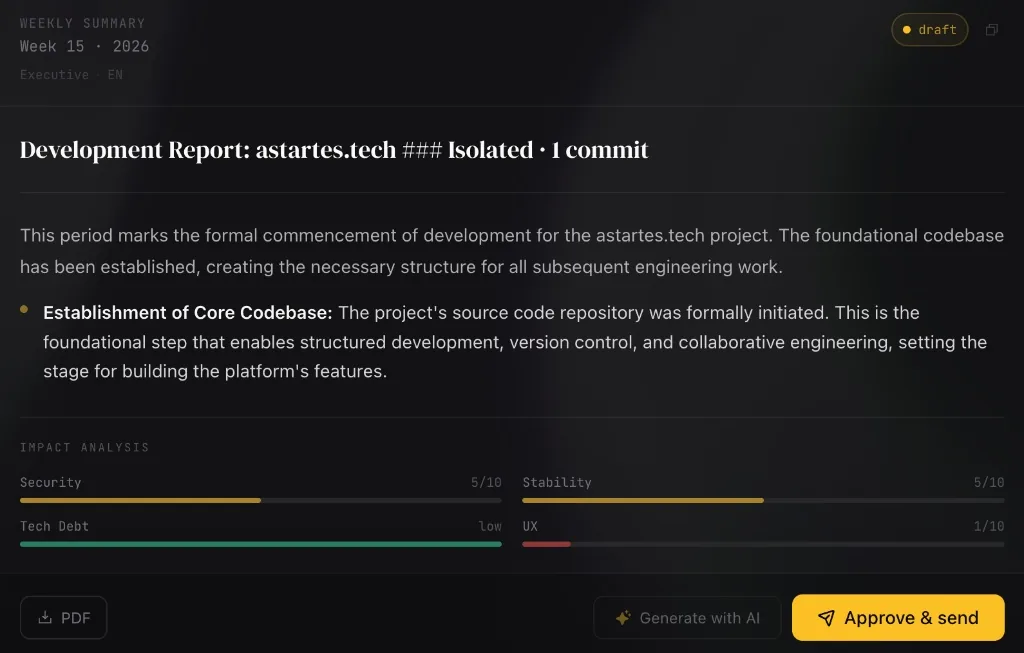
Your eyes are the last feature.
Automation writes the draft. You approve it. commitplain does not send anything to a client without an explicit human decision — that's the feature agencies keep asking us not to remove.
- The complete draft is available before any send
- Edit the text freely if you need to adjust anything
- Choose to send to the client, to your own email, or both
- The client receives nothing until you explicitly approve
The reporting problems these features were built for.
If the product feels opinionated, it's because it is. These are the same essays that shaped what commitplain does and what it deliberately refuses to do.
- Reporting engineering
GitHub vs Jira for client reports: why commit history wins
Tickets describe what you planned; commits describe what you shipped. The report should follow the commits.
- Playbook
What to include in a software agency status report
A minimal weekly structure that makes non-technical clients feel in control without drowning you in prose.
- Craft
Stop writing client reports from memory
The exact moment reports drift from reality — and why anchoring them to commits eliminates an entire class of client friction.
Try every feature on a real repo.
Connect a project, generate a draft, review it, send it. Seven days, no card required, and the fastest way to see whether this fits how your team actually reports.